18 April 2006

Judicial Blogging

I have been following 3L Epiphany posts for a while and I was pleasantly surprised to see that some judges are blogging.

The author has even sent the following survey - two judges have answered and granted permission to publish their answers to the following questions:
  1. When you cited a legal blog, did you consider it unusual or unprecedented at the time?
  2. How often do you read legal blogs?
  3. Which are your favorite legal blogs?
  4. Do you consider blogs to be substantial and legitimate forms of scholarship?
  5. Do you think legal blogs will begin to be cited more often by the courts?
  6. What predictions do you have about the effect of legal blogs on the profession?
  7. What other changes to the legal profession do you foresee because of the Internet and the online world in general?
  8. Do you regularly read law reviews? If so, which are your favorites?
  9. What advantages and disadvantages do legal blogs have when compared to law reviews and other traditional forms of scholarship?
  10. Do you have an opinion about whether law students, lawyers, and/or law professors should blog?
  11. Do you think it is appropriate for judges to blog? If you were to start one, what subject(s) would you write about?
  12. (Off the subject of blogging:) If you could change one thing about the legal educational system, what would it be?
See the answers by Justice Judith Lanzinger (Ohio Sp. Ct.) and by Justice Richard G. Kopf (U.S. District Judge, Nebraska). Fascinating.

[cross posted on slaw]

Categories:

17 April 2006

Number of Blogs Doubling Every Six Months

Amazingly enough, about one blog per second is now created (75,000 per day), the number of blogs is doubling every six months, about 50,000 legitimate posts occur every hour in the blogosphere and almost 20 million (55%) bloggers are still blogging after 3 months. Read all about it in David Sifry's Alerts:


Categories:

14 April 2006

G2TT and BarCamp Ottawa (22 April 2006)

The pregnancy is almost over, by early June 2006, Government 2.0 Think Tank ("G2TT") will officially launch with a Drupal powered web site, ready to tackle its first project - Leveraging Web 2.0 Technologies in the Government of Canada.

Until then, G2TT offers:
If you are interested in G2TT, please use the signup form. If you're in Ottawa, you're also welcome to join us at BarCamp Ottawa, Saturday, April 22nd, all day.

13 April 2006

Favorite Articles on Tagging

I am responding to Bill's invitation (Portals and KM) by offering the following resources.

Here are my favorite resources on social tagging in a corporate context and more on tagging. I have also written on topic a while ago. This article from InfoTangle on Community 2.0 is also well written and I like the many clarifications it offers. The latest I have read about dogear is here (see my comment waayyyy below - it's a long and funny article).

Because social tagging is intricately related to folksonomies, folksonomies resources are also useful to take a look at.

PS: Bill - I had to answer here because your comments do not accept the "a" tag. ;-)

11 April 2006

Object Oriented Editing and Personal Wikis: Wildly Addictive!

I have been extensively using, for over a month, a personal mini-wiki tool called "TiddlyWiki". Do not let the deceptively funny name distract you from its powerful features! Over 3,600 del.icio.us users have bookmarked the original TiddlyWiki site by Jeremy Ruston. Why is it so successful?

A TiddlyWiki is a Free and Open Source, self-contained HTML file. That's it. No software, nothing needed, you can carry it around on a USB stick. It is similar to a wiki because you can create distinct topics that can reference each other. There are many flavours of TiddlyWikis, such as a student edition or the MonkeyPirate edition, or the advanced ELS Studio version.

A TiddlyWiki is incredibly simple to edit and to add new content: see this tutorial by JeremyH. There are a lot of good resources available and a very dynamic Google User Group.

I have used it to create and regularly update this discussion paper. Just as any other technology and solution out there, such as blogs and wikis, TiddlyWikis are not good solutions for all requirements. For example, Wikipedia would never fit in one TiddlyWiki.

TiddlyWikis are great:
  • For small web sites with micro-content;
  • For people (like me) interested in making non-linear papers available online;
  • For students, researchers, anyone wanting to organize personal notes and topics...
...And many more possibilities that you can imagine.

To be used in a Canadian federal government context, a brave soul would need to develop (a) a bilingual plugin (TiddlyWiki features can be significantly augmented with freely available plugins) to facilitate the creation and updates of bilingual tiddlers; and (b) a Common Look & Feel TiddlyWiki.

05 April 2006

Shifting Gears: From Applications to Services

In "Software Out There", John Markoff, from the New York Times, describes how the web has been evolving into a vast array of online services as opposed to desktop applications. When mainstream media finally notices established trends, governments and corporations are more likely to follow suit, especially when considering such priceless quotes (from John's article):
Mr. Ozzie, who used the Firefox browser (an open-source rival to Internet Explorer) during his demonstration, said, "I'm pretty pumped up with the potential for R.S.S. to be the DNA for wiring the Web."

He was referring to Really Simple Syndication, an increasingly popular, free standard used for Internet publishing. Mr. Ozzie's statement was remarkable for a chief technical officer whose company has just spent years and hundreds of millions of dollars investing in a proprietary alternative referred to as .Net.

As posted earlier in The Death of Enteprise Software, John correctly predicts the migration of monolithic desktop and corporate client-server based applications to web based services:
As a result, computer industry innovation is rapidly becoming decentralized. In the place of large, intricate and self-contained programs like Microsoft Word, written and maintained by armies of programmers, smaller companies, with just a handful of developers, are now producing pioneering software and Web-based services. These new services can be delivered directly to PC's or even to cellphones.
John's article also covers (briefly) a few other Web 2.0 technologies such as Ajax.

Reading his article, I discovered the following services:
  • WINKSite. From their site: "In minutes, you can set-up a free mobile site that's available worldwide on any web-enabled phone, PDA or desktop PC. Each mobile site is outfitted with easy-to-use mobile channels including chat, blog, mobile feed reader, surveys, journal, forum, calendar, guestbook, bookmarks, email and more."
  • CastingWords. Human transcription services for audio files, 42 cents a minute. Interesting service for podcasters. Je me demande si ce type de service existe en français!
  • Amazon S3. Storage service for developers priced at 15 cents per GB used per month plus 20 cents per GB of data transferred.

03 April 2006

Supreme Court of Canada: Public Factums?

The Supreme Court of Canada syndicating factums filed in court via RSS feeds available on its web site, subject to a Canadian Creative Commons Attribution - No Derivative - No commercial uses license: fiction or reality?

Thanks to the Canadian Bar Association Supreme Court of Canada Liaison Committee, this issue, framed as "whether it would be worthwile to post Supreme Court factums on a website after the conclusion of cases", is now considered. In order to help moving it along, I would ask lawyers reading this blog to take the survey - it only takes 2 mins: take the survey.

Categories:

01 April 2006

When April 1st Strikes

Funny,

How some news get picked up, even the funny ones. Google Romance is a riot (follow the full explanation!). Scobleizer, Microsoft employee, defecting to Google, instantly attracted lots of buzz in the blogosphere and was picked up by Slashdot.

My all time favorite however is the news that Microsoft, or rather Bill Gates, purchased OpenOffice.org! Attracted lots of attention... because they put it on their home page and will likely disappear tomorrow, here it is:
For an undisclosed sum reputed to be in the billions, Microsoft's Bill Gates has personally bought the leading open-source desktop project. Saying he "was sick and tired of open-source eating away at his profits," the world's richest man decided to put an end to the nuisance and simply buy OpenOffice.org. It will form part of a growing list of Microsoft acquisitions, including several erstwhile competitors, a considerable number of prominent politicians, and a few small governments.

The initially stunned OpenOffice.org community--a happy-go-lucky international band numbering in the hundreds of thousands--later turned to champagne to celebrate their newfound wealth. "Bless Bill!" one happy Torontonian exclaimed, bubbly in hand. "With all this money, I can beat Mark's time in orbit!"

Gates has assured all current OpenOffice.org users that their future migration path to Microsoft Office is guaranteed thanks to OpenOffice.org's faultless support of MS Office files formats. Users can further rest assured that the full functionality currently provided by OpenOffice.org 2.0 will be available in MS-Office 2020 - or possibly 2030.

30 March 2006

Interested in Folksonomies?

Anyone interested in deepening one's knowledge of folksonomies, after reading "Tidying up Tags?" by Marieke Guy and Emma Tonkin, should take a look at InfoSpaces, a blog by Emanuele Quintarelli. Emanuele is an Italian information architect with a sharp analytical mind. I recommend, in particular, the following posts authored by him:
Emanuele explores in his blog the tension that exists between free form folksonomies, such as those found on del.icio.us, and more ordered taxonomies. Several of his inquiries run along the theme of how to exploit the best of both worlds - folksonomies freedom and semantic order.

29 March 2006

Taxonomy of Legal Blogs

[cross-posted on slaw]

3L Epiphany wrote a very interesting taxonomy of legal bogs. On March 17th, 2006, the list was up to 686 legal blogs, all categorized and sorted. A definite resource for anyone interested to witness how many law blogs, or blawgs, exist out there.

Categories:

Office 2.0 Applications

I have just read Office 2.0 by Ismael Ghalimi, from IT | Redux - his post is a a great lead into the world of Office 2.0 applications.

Office 2.0 applications enable users to use software online instead of software installed on their desktops. There is now an impressive variety of such applications. Thanks to this list compiled by IT | Redux, you now have access to an extensive directory of Office 2.0 applications with corresponding links to application web sites and reviews by Solution Watch, TechCrunch and IT | Redux.

28 March 2006

Gartner Predictions on RSS, Corporate Blogging and Wikis

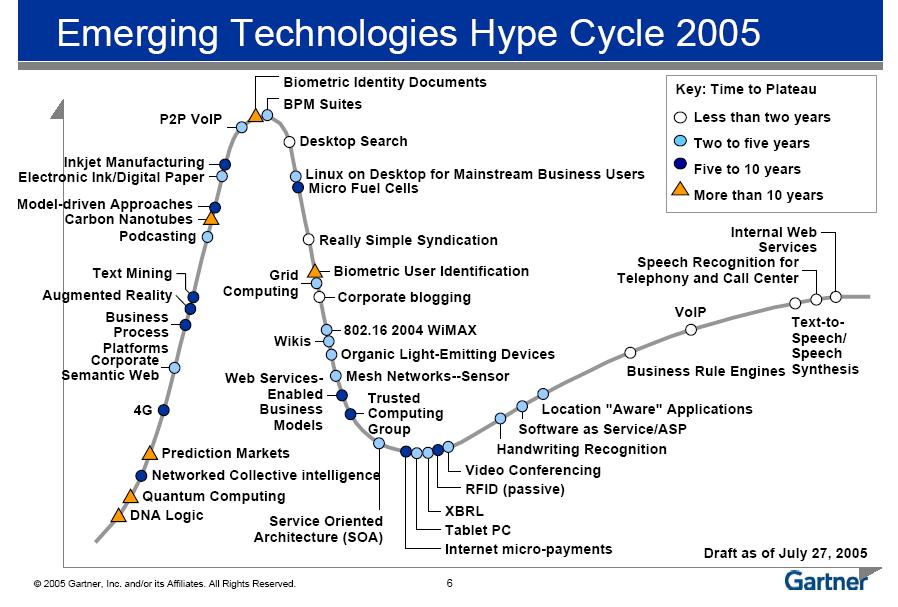
As reported by Cerado, the Gartner Group (see the full report in pdf format) has published their 2005 Hype Cycle, from which we see that RSS and corporate blogging are less than two years away as standard corporate capabilities. Wikis are trailing behind on a 2 to 5 years horizon:

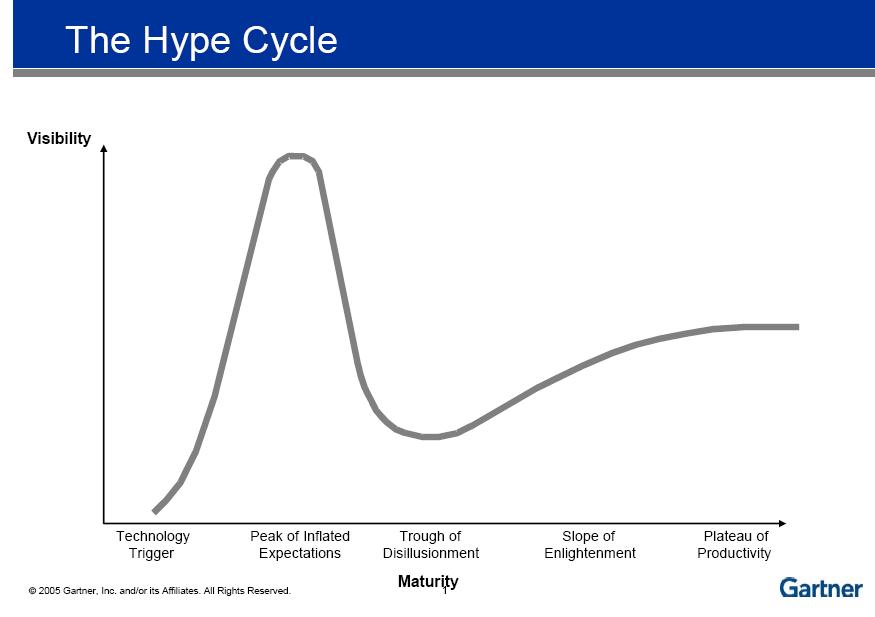
The Gartner Hype Cycle is a well know, evolution in time depiction of technology trends:

One thing I can't figure out is why they left out social tagging from their graph...

23 March 2006

Solving Corporate Email Overload - with blogs

To alleviate email overload in corporate and governmental settings, one can efficiently use subject-based Blogs, a Web 2.0 technology. Mass emails are then re-directed to these subject-based blogs.

Because these blogs are:
  • Searchable - both as part of Search Collections and as a web page with a search function;
  • Sorted - by definition, each blog will be created and used for one topic and purpose only, therefore the sorting and categorization will occur at the source instead of having thousand users trying to organize this massive traffic themselves in different ways;
  • Archived - in the sense that the availability of blog posts will go back farther than the email account creation date. This limitation does not allow users to efficiently go back in time and search. Blogs solve this problem;
  • Syndicated - RSS feeds will be associated with each blog, enabling mandatory (based on user category) and optional (based on user interest) subscription;
They represent a simple technology, often leveraging Free and Open Source Software, capable of dealing once and for all with a real tangible problem for most of not all users in large corporations and governments.

22 March 2006

The Web 2.0 Enabled Law Firm

[cross-posted on slaw]

For the past several months, I have been diligently exploring how Web 2.0 technologies could better support the work of lawyers. I'm happy to report my findings in this discussion paper, albeit in a particular context, using a TiddlyWiki. If you are interested in what it takes to write a document like this, make sure you check the About section in the paper.

Web 2.0 and the Legal Profession is also specifically discussed.

Comments and suggestions are welcome.

Categories:

20 March 2006

Firefox 2.0 (Alpha) Released

An early release of Firefox 2.0 (Alpha) is now available, as reported by Michael Arrington in TechCrunch.

Categories:

19 March 2006

Over 3,000 People Have Bookmarked These Pages

Since I have started using del.icio.us on December 10th, 2005, I have bookmarked and tagged over 450 Internet pages. 14 of these pages have also been bookmarked by more than 3,000 other people.

Here is the list (the numbers were accurate when I wrote this post):
  1. Quick Online Tips: Absolutely Del.icio.us - Complete Tool Collection (10,855 bookmarks). Not suprisingly, the first resource is a page regularly updated about del.icio.us hacks, plugins, extensions and API's
  2. script.aculo.us - web 2.0 javascript (9907 bookmarks): "script.aculo.us provides you with easy-to-use, compatible and, ultimately, totally cool JavaScript libraries to
    make your web sites and web applications fly, Web 2.0 style"
  3. digg (7762 bookmarks): "Digg is a technology news website that employs non-hierarchical editorial control. With digg, users submit stories for review, but rather than allowing an editor to decide which stories go on the homepage, the users do"
  4. Last.fm (6961 bookmarks): "You get your own online music profile that you can fill up with the music you like. This information is used to create a personal radio station and to find users who are similar to you. Last.fm can even play you new artists and songs you might like"
  5. Writely - The Web Word Processor (6016 bookmarks): "Pick exactly who can access your documents. · Upload from Word/OpenOffice & save to your desktop. · Edit your documents anytime, from anywhere." Note: Writely has been purchased by Google
  6. Prototype JavaScript Framework: Class-style OO, Ajax, and more (5630 bookmarks): "Prototype is a JavaScript framework that aims to ease development of dynamic web applications. Featuring a unique, easy-to-use toolkit for class-driven development and the nicest Ajax library around, Prototype is quickly becoming the codebase of choice for the development of Web applications"
  7. The Best Web 2.0 Software of 2005 (5289 bookmarks): 2005 Review of the best software, by Dion Hinchliffe
  8. Yahoo! UI Library (4031 bookmarks): "The Yahoo! User Interface Library is a set of utilities and controls, written in JavaScript, for building richly interactive web applications using techniques such as DOM scripting, HTML and AJAX"
  9. WordPress › Free Blog Tool and Weblog Platform (3638 bookmarks): "WordPress is a state-of-the-art semantic personal publishing platform with a focus on aesthetics, web standards, and usability. What a mouthful. WordPress is both free and priceless at the same time"
  10. YouTube - Broadcast Yourself (3617 bookmarks): "Broadcast yourself. Watch and share your videos worldwide!"
  11. QuirksMode - for all your browser quirks (3560 bookmarks): "contains more than 150 pages with CSS and JavaScript tips and tricks, and is one of the best sources on the WWW for studying and defeating browser incompatibilities"
  12. TiddlyWiki - a reusable non-linear personal web notebook (3392 bookmarks): A free micro-content and object-oriented editing environment consisting of a JavaScript/HTML page - no software is needed. Note: I will soon publish a series of posts dedicated to TiddlyWikis - I have recently been experimenting with them and I think they are extraordinary
  13. Feed Icons - Help establish the new standard (3201 bookmarks): New standard icon to be used when identifying syndicated content
  14. Dojo - DojoToolkit.org (3030 bookmarks): "Dojo is the Open Source JavaScript toolkit that helps you build serious applications in less time. It fills in the gaps where JavaScript and browsers don't go quite far enough, and gives you powerful, portable, lightweight, and tested tools for constructing dynamic interfaces. Dojo lets you prototype interactive widgets quickly, animate transitions, and build Ajax requests with the most powerful and easiest to use abstractions available"
These are my most popular links. You can find at del.icio.us popular sites the list of most popular sites as ranked by all users.

Canoë | Mainstream Media Goes Blogging

Canoë, a francophone Quebec-based mainstream media site, goes blogging (in French a blog is called a "blogue"). Make sure that you scroll down the Canoë Blogs home page, past the latest posts from several blogs, in order to find the blogs.

Some room for improvement:
  • Canoë ought to implement trackbacks in their blogs. Only comments seem to be supported at this time;
  • Permalinks should be more clearly accessible. Not all readers will know that they have to click the "comments" hyperlink in order to access to permanent link to the URL post, etc.;
  • On this note, some of the links in the "previous posts" section do not seem to be properly coded. For example, when I tried to access a post "Petit délice d'un..." in Jasmine's blog, although the browser displayed a permalink - that link took me to her blog home page.
As I surveyed a few posts, it seems that one of their bloggers, Patrick Lagacé from the Journal de Montréal, is discovering just how fun can be unmoderated comments (!). Jasmine Legault is using her blog as a diary.

Overall, a pleasant suprise to see mainstream media en français embracing blogging (timidly!), even if a few quirks need sorting out.

13 March 2006

How To Poison Your Career

From time to time my readings take me on various tangents, and this time I ended up on a blog I had not previously visited, on this article: 10 Ways to Poison Your Career. It's fun... and truthful! Take a look - well written and insightful.

Categories:

12 March 2006

Social Tagging Makes It to A Mainstream Library

Social Tagging, or bookmarking, develops over time a folksonomy (as opposed to more rigid corporate taxonomies). LibraryThing, for example, successfully exploits this concept in the realm of books, to the delight of their users.

Recently, it seems that social bookmarking made it in the world of mainstream libraries: have a look at this library item in the online catalog of the Penn Library. They also have LiveChat support. That rocks! Thanks to "UPenn Catalog Tagging" by Steven M. Cohen for reporting this.

I strongly believe in the usefulness of social bookmarking in the enterprise context. Hopefully, we will see in the coming year an increasing number of examples where mainstream institutions are embracing enterprise bookmarking.

11 March 2006

Using Siteground As Web 2.0 Playground (Wikis, Blogs, CMS...)

It is bound to happen: after you have been exposed to a zillion bright ideas for blogging platforms, wikis, different Content Managements Systems; at some point, you want to start your own site, your own wiki, your own blog... Wait, start what exactly?! What if you're not sure, or what if you want a wiki and a blog and... and...?

I recently found myself in this situation. I want to start a private association and provide its members with an online community. Because of the nature of the association, I immediately thought of using a wiki. What wiki to use, then? Wiki Software to install on your own server was out of the question, so I started looking for a hosted wiki solution, such as Stikipad, Foopad or PBWiki. I even tried Stikipad a little. But I then realized: why not use, for my space, the same software powering Wikipedia? After all, if it works for that; it would sure work for my small community. Wikipedia is powered by MediaWiki, a free software package originally written for Wikipedia, but also powering other wikis now.

After some research, I finally settled for Siteground at $5 a month. What initially turned out as a requirement for a "password-protected MediaWiki hosted solution" morphed into a "why not a Web 2.0 (and more) hosted playground". Why? Take a look a this.
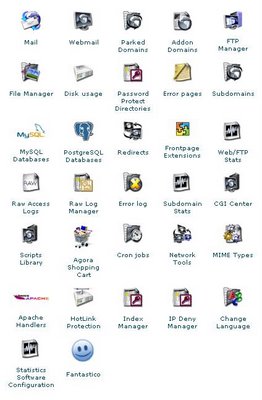

Upon registration to Siteground, you can also register a domain name.

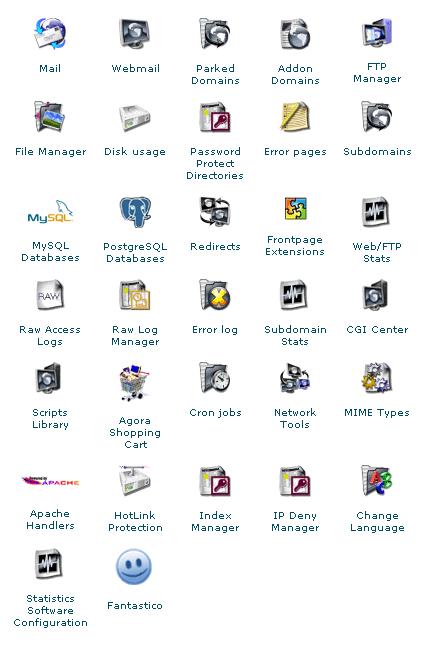
What I realized, with Siteground, is that you have access to a lot of features via the C-Panel. What you see opposite is a partial screenshot from the C-Panel, giving you an idea of the control you have over your web site. I draw your attention to the subdomains icon (last 2nd row): by adding subdomains such as "wiki.domain.(whatever)", "blog.domain.(whatever), "forum.domain.(whatever)", etc.; you can create as many subdomains you wish and start experimenting with blogs, wikis, bulletin boards or forums; and I suggest that you keep your root directory ("www.domain.(whatever)") for a Content Management System (CMS).

Until such time as a CMS will offer a truly integrated and ideal mix of traditional CMS / wiki / blog / etc (what an idealistic notion); this approach works for me, especially at a total of $5 per month.

The last icon on the C-Panel is Fantastico. Fantastico allows you to automatically install an impressive array of hosted applications.
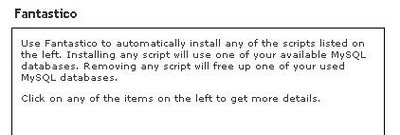
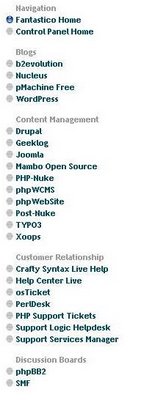


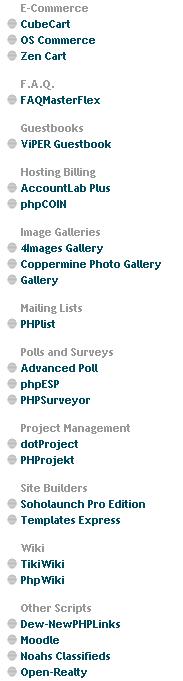
As you can see from the list opposite (partial list), there are several blogging platforms (including WordPress) and a wide range of Content Management Systems (incidentally I just found out that socialtext web site - an enterprise blogging platform - is now powered by Drupal which is available in the Siteground C-Panel CMS list).

I admit that I toyed with the notion of diving right away into CMS installation and deployment, especially when I looked at intuitive user interfaces such as the TYPO3 UI. Upon further reading, I realized I was probably overextending myself, about TYPO3 anyway - typo3.org recommends a month to learn the software:
Be aware that all the flexibility and richness come with a price: complexity. If you're not ready to spend a month learning the system and are in a hurry to satisfy a customer, you should probably look into getting somebody to help you or look for something else.
I looked then at Mambo and Joomla and found them to be closely related, for obvious reasons. Considering the history of both products, I would prefer Joomla. Its online manual seems satisfactory.

I have to do further reading though on Drupal and its CivicSpace distinct distribution in order to develop a realistic appreciation of what it takes to deploy and maintain a community website. For that purpose I have ordered "Building Online Communities With Drupal, phpBB, and WordPress" by Robert T. Douglass, Mike Little and Jared W. Smith.

The Fantastico list continues like this (and even more that did not fit in my "print screen"):
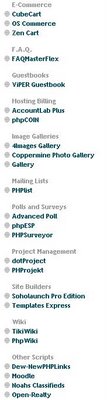

From E-commerce, FAQ, guestbooks, polls & surveys to site bulder and wiki scripts; the list goes on. It is also possible to install other applications on the server but the list here is a very good start for people without a definite idea of what they want to use.

I should also conclude by saying that I appreciated the quick turnaround time from Customer Support, both pre-sales (using their online chat system) and after-sales technical support on two occasions. First ticket was answered in 30 mins and the second one in 20 mins, both tickets were routine.

At some point I plan to migrate this blog, currently hosted on blogspot.com, to a Wordpress platform. I'm not really sure how yet, but I think Drupal allows each community member to have its own blog, something I will check further. If you know of a good "how-to" guide to wisely deploy and manage the CivicSpace distribution of Drupal, please let me know!!

To-do list for the next little while:
  1. Continue blogging... perhaps less frequently so because of -
  2. Develop the "Government 2.0 Think Tank" private association wiki, enough anyway to sart recruiting its founding members and get our first project going ("Leveraging Web 2.0 Technologies in the Government of Canada"). Note: membership in this association will be restricted to Public Servants at the federal, provincial and municipal levels and to academics without private industry ties.
  3. Investigate and choose CMS/Blogging/Forum platforms for the association, deploy them.

05 March 2006

Who Needs A Library, Anyway?

Students and the Public need libraries, fair enough: schools, universities, cities, villages... When the Grande Bibliothèque du Québec (official web site here) was planned, I would have preferred to see the total project cost (Cdn$90M) injected into a "book acquisition revitalization program", allowing local libraries, especially in remote areas of Québec; to revitalize their collections - especially books for children. That story and the shifting uses of corporate libraries prompted me to think of the continued relevance of corporate and governmental libraries: do we need them?

The question becomes increasingly difficult to answer in corporate and governmental settings, because of workstation access to relevant information. The 21st century knowledge workers in corporations and governments have access to more and more information right from their desktops: why walk to their "in-house" libraries?

Well, for starters, one of the good answers is not very scientific but resonates true - see this recent post by Amanda Robertson:
I think any librarian would agree that the most important part of the library isn’t the materials contained within but how they are used. (...) [Patrons] certainly want the instant desktop access of electronic copies, particularly when it comes to reusing data from other in-house work. But they also want the copy in paper, and many of them can’t yet imagine keeping up with the industry by reading e-journals.

Additionally, many of them use the library serendipidously. They poke their head in the door and ask me where petroleum technology materials are shelved. I show them, and they browse through the shelves. Sometimes they find something they wouldn’t have noticed when searching the OPAC.
Serendipity is fine. However, as powerful electronic search, discovery and retrieval methods become available; the never-to-stop quest for governmental and corporate cost efficiency will result in second-guessing the existence of several corporate and governmental libraries, especially in settings where the community served is article-centric.

I thoroughly enjoyed the issues and discussion on topic as presented in "paved paradise: the future of (a particular type of) research library?" by Richard Akerman (thanks Amanda for the link). Highly recommended reading. I really liked this part:
When I said "pave over the library" it got read I think as "pave over the librarians". To me, librarianship and librarians are completely separate from their current physical container, the library. You could pave over the library and still have as many or more librarians providing services, just from different locations, e.g. co-located with the researchers.

My fundamental argument is more around holdings, and how they are presented. Firstly, is it true that the sciences mentioned above are article-centric? If they are, then

1. Why would I use as my primary research tool a giant physical container of lifeless, non-searchable paper articles that I have to request and wait for, rather than having live articles online that I can access instantly, with clickable linked citations, interconnections to data, and all sorts of wonderful electronic goodness?
2. Why is the library's website book-catalogue based, or journal-title-based, rather than putting full-text articles front and centre?

Also, to make it worse, is it true that science is moving beyond just articles to becoming data-centric as well? If so, where is the library transformation to data-centricity?

The article by Richard is thoughtful, beginning to end, and the comments are worth reading too.

26 February 2006

Thinking in Web 2.0: The 17th Way

I just finished reviewing a post by Dion Hinchcliffe called "Thinking in Web 2.0: Sixteen Way", and I could not resist the temptation of adding a 17th Way, for those of us primarily concerned with large governmental and corporate intranets:

17. The Web 2.0 is for governments and corporations too. The world wide web is changing, evolving into a new kind of user experience, leveraging new technologies such as blogs, wikis, RSS, web-based applications using Ajax, and many more technologies. Governmental and Corporate Information Managers need to seriously think and imagine how they could replicate this internet evolution into what we could call intranet revolutions, because, as those of us working in large corporations or governments know, introducing new trends and technologies in large intranets can often prove a formidable challenge, in part due to bureaucracy, diffused information leadership and information management confusion (see the entire post on topic here). Notwithstanding these obstacles, can Information Managers afford not to introduce Web 2.0 into their environments, and run the risk of increasing user experience obsolescence?

25 February 2006

Social Tagging For The Enterprise

Web 2.0 technologies will promote and enable fundamental changes on intranets. They will alleviate many user "frustrations" with their intranet environment, such as useless search capabilities, email overload, rigid taxonomies, etc.. A peculiar difficulty, however, facing forward-looking IT (or business user) early adopters of Web 2.0 technologies is the fact that Web 2.0 is often "the web as a platform": That web is, currently, mostly the Internet as opposed to intranets. Some resources are only available through an Internet connection. Often, these resources are unavailable due to lack of connectivity to the Internet, corporate firewalls or corporate policy. The larger the corporation, the most likely there will be challenging obstacles.

What of eureka moments, then? How can we exploit moments of clarity when encountering great web 2.0 technologies that feel like a natural extension of the way we "think", of the way we work? One such technology is social tagging (or "social bookmarking"), best exemplified with del.icio.us and many articles illustrating how to best exploit social tagging, such as this one by Marshall Kirkpatrick and this one by Brendon Connelly, and others that go in more depth on topic, such as "Folksonomies: Tidying up Tags?" by Marieke Guy and Emma Tonkin - introduction of the article quoted here:

A folksonomy is a type of distributed classification system. It is usually created by a group of individuals, typically the resource users. Users add tags to online items, such as images, videos, bookmarks and text. These tags are then shared and sometimes refined. A general review of social bookmarking tools, one popular use area of folksonomies, was given in the April edition of D-Lib [ref omitted]. In the article the authors elaborate on the approach taken by social classification systems and the motivators behind tagging. They write, "...tags are just one kind of metadata and are not a replacement for formal classification systems such as Dublin Core, MODS, etc.... Rather, they are a supplemental means to organise information and order search results."

In this article we look at what makes folksonomies work. We agree with the premise that tags are no replacement for formal systems, but we see this as being the core quality that makes folksonomy tagging so useful. We begin by looking at the issue of "sloppy tags", a problem to which critics of folksonomies are keen to allude, and ask if there are ways the folksonomy community could offset such problems and create systems that are conducive to searching, sorting and classifying. We then go on to question this "tidying up" approach and its underlying assumptions, highlighting issues surrounding removal of low-quality, redundant or nonsense metadata, and the potential risks of tidying too neatly and thereby losing the very openness that has made folksonomies so popular.

I have recently come across two interesting options for introducing social tagging into corporate and governmental intranets. The first is a platform developed by IBM, the second is a Free and Open Source Software ("FOSS" - on FOSS in the Canadian Government see the applicable Treasury Board of Canada FOSS guidelines) module for PHP/MySQL applications.

First, in the corporate environment, IBM has moved forward by developing "dogear", an enterprise-scale social bookmarking system. David Millen, Jonathan Feinberg and Bernard Kerr, from IBM, have written an excellent article based on the following query:
The apparent success of Internet-based social bookmarking applications begs the question of whether large enterprises or organizations would also benefit from social bookmarking systems. To investigate this question, at IBM we are designing and developing an enterprise-scale social bookmarking system called dogear. The rest of this article describes the design challenges and early lessons learned from a friendly trial of the technology.
Their article briefly describes the evolution of personal bookmarks into social bookmarks and the common features of social bookmarking systems. More importantly, the article describes desirable features in order for social bookmarking communities to successfully develop:
  • Identity and Transparency. del.icio.us allows users to choose pseudonyms instead of real names. In an enterprise context, IBM has chosen to implement dogear using real names: "real-name identity would facilitate communication among users of the application since the various corporate collaboration tools (e.g., corporate directories, e-mail, chat,) all use real-name identities. There is also a strong cultural norm within the organization to use more formal names within corporate applications." It seems that the IBM team has struck an optimal balance on several decision points for identity and transparency, for example, by enabling both public and private bookmarking and by implementing team-based and role-based collections. I agree with the authors that these decisions are not easy to make. In their own words: "The decisions to use real-name identity and to support private bookmarks were made with some trepidation. The success of social software applications, in general, requires participation to reach critical mass to provide value to users and to ensure a sustainable level of contribution and vibrant interaction. Real-name identity may discourage some people from using the system, and private bookmarks will significantly reduce the benefits of information sharing among users. For a large enterprise, however, we believe that the ability to reach critical mass will not present a problem."
  • Alerting and Discovery. A very useful feature of social bookmarking systems consists in being alerted whenever a resource is added by a user, when a resource has been tagged with a keyword of interest, or any combination thereof. del.icio.us offers RSS feeds in order to deliver this requirement. IBM has adopted the same approach, potentially moving the corporate world closed to a 2006 prediction that "everything will get an RSS feed" (see prediction no 5 by Dion Hinchcliffe!)...
  • Designing for Extensibility: Enterprise Remixing. The design of the IBM system encourages enterprise remixing "by giving potential exploiters a number of easily parsed data formats from which to choose".
  • Exploiting the Links. An enterprise bookmarking system, over time, represents an inherent assessment of valued information resources. Collections of links can be exploited by the enterprise to (a) augment enterprise search applications, as such collections constitute "search collections" within the meaning of this earlier post; (b) supplement directory information about a particular user; and (c) to augment workgroup online content.
The authors are excited about the prospects of dogear and I share in their excitement - and hope dogear will make it to fruition soon! (and where is the IBM dogear public blog anyway?!)

Here is a snapshot dogear's interface:

Second, another promising way of introducing social bookmarking in a corporate or governmental context is to exploit Free and Open Source Software (FOSS), such as Freetag, released under both BSD and GNU Lesser GPL library license (see license for details):
Freetag is an easy tagging and folksonomy-enabled plugin for use with MySQL-PHP applications. It allows you to create tags on existing database schemas, and access and manage your tags through a robust API.
Hopefully, there will be an increasing number of "social bookmarking for the enterprise" options in the coming months.

23 February 2006

LibraryThing Innovates Again

In a previous post, I have written about LibraryThing and described it as follows:
LibraryThing is conceptually equivalent to del.icio.us, used to tag web resources, produce tagrolls, see how others have tagged similar content, etc.; but for books.
Today, LibraryThing announced how it intends to solve a problem that has plagued librarians and giants like Amazon.com: how to relate comments, recommendations, reviews, ratings, etc. not only to one instance of any given book, but to all instances of the same book, published by different editors.

LibraryThing leverages the power of the masses: any LibraryThing user can associate "works" together. The response has been very strong:
Starting three days ago, I announced a trial project to let users determine what books belonged together, the first time anything like this has been attempted. Using simple check boxes, users could go through a favorite author's works, combining and separating editions as necessary.

The response has been startling to say the least: In three days, users have combined 17,000 times, mashing together 42,000 works! Users have spent hours at the task, and debated the nuances in a blog post that now sports 182 comments.
More information on LibraryThing is available here.

22 February 2006

Answers.com Goes Legal


Thanks to LibrarianInBlack for reporting this: answers.com has incorporated two new legal resources - legal biographies and a legal encycopedia.

coCommenting and Managing All Your Comments


After I read a review by Michael Arrington (see the original review and the update), I have decided to try coComment.

With CoComment, you enter your comments throughout the blogosphere as usual, with one exception: just before you submit your comment, you click on the coComment bookmarklet. This sends a copy of your comment to your coComment account. You can then keep track in a central location of all your comments and, more importantly, you can view subsequent comments from others in the same conversations.

In addition, if youhave a blog, coComment offers you the option of adding a widget that shows recent comments.

Unfortunately, coComment does not (yet?) support trackbacks.

21 February 2006

Lawyers Are... Are Not Knowledge Workers?

Just finished my contribution (on slaw) to the subject issue. Comments welcome, preferably over there!


Employees Are the Most Precious Resource... Do Something About It!

The notion of employees as the most precious resource of government and corporations is widely known and accepted. Surprisingly, many employers do not leverage the creativity of their employees, even if the ability of expressing one's creativity is increasingly important.

Fortunately for employees and employers alike, there are ways to engage employees in expressing their creativity and to meaningfully translate ideas into better services, products, profitability. Case in point in a recent post by Toby Ward (as reported by James Robertson): the British Telecom (BT) online idea jar (savings of U$173M over 4 years) and IBM's IDEAS program, generating approx $17M in 2001 alone.

National Library of Australia Teaming With Flickr!

What a great concept: a public institution, namely, the National Library of Australia (NLA), is teaming up with flickr.com in order to increase the number of contemporary images in PictureAustralia. Thanks to LibrarianInBlack for reporting this interesting "web 2.0 Public Service / private sector partnership".

As reported in the original NLA post:
Now you can contribute your images to PictureAustralia by loading them into our two groups available on FlickR, PictureAustralia: Australia Day and PictureAustralia: People, places and events.

The PictureAustralia: Australia Day group is a collection of images relating to this day of national significance.

The PictureAustralia: People, places and events group is a collection of images depicting the people, places, and events, which make Australia unique.

Why not search PictureAustralia for a streetscape or town as it looked in the early part of the 20th Century and then capture it as it looks today.

Each week we will collect the metadata (descriptive information) and the thumbnail images from our groups and load them into PictureAustralia, enhancing its value to researchers and the general public. The first load will occur the week following Australia Day 2006.


05 February 2006

Back to Canada - Where Is the Snow?!

Well, taking one week off in Dominican Republic has a way to make you think about early retirement!!

We went to an all-inclusive resort called Natura Park Resort Eco & Spa, one of the best resorts in the Punta Cana area of Dominican Republic.

What a great time we had! I have temporarily added a flickr badge of our vacation on this blog home page (side bar menu).